In these modern times where everything is available on the internet, it's hard to keep your kids live in control. The internet is a place where cyberbullying is excessive because there are people behind the screen. and, to make sure that your kid is safe while using the internet, what should you do to make it possible? download AirDroid Parental Control app. it has a lot of features that will guarantee your kid's safety. here is how you can use it.
what is AirDroid Parental Control App:
Simply told, AirDroid Parental Control is a feature-rich tool designed for families. Parents can use the software to remotely manage and keep an eye on their children's Android devices. The range of remote administration is broken down into a number of aspects that are intended to increase children's safety while also keeping things under their control. Parents only need to download the AirDroid Parental Control app on their own devices and the AirDroid Kids app on the devices of their children in order to implement parental control. The entire registration process simply takes ten minutes and is quite simple. Once finished, you don't need to ask for your child's smartphone again. Since AirDroid Parental Control is concerned with the safety of many children, customers can add other devices as part of their subscriptions and monitor a range of metrics for their children.

features of AirDroid Parental Control App:
Keeps you updated about real-time location:
When a loved one leaves without giving you a clear notion of when they will return, you experience worry. Thanks to the AirDroid Parental Control app, parents can now use their devices to track where their kids are in real-time. You may also set up certain geographic areas and get immediate alerts when your kids arrive or depart those areas if they have a fixed pattern and frequent the same places. Even location history capability is included in the app, allowing you to look back and see where your kids have been in the past.
Daily usage report:
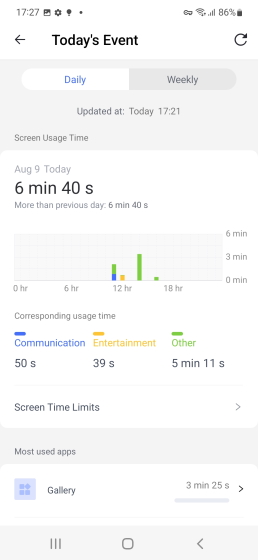
Even when they claim not to, kids often have their faces glued to their phones. AirDroid Parental Control displays to the parents the daily and weekly usage of the children's devices so they can confirm how much time the children are truly spending on their phones. Parents get this information in a dashboard report that includes statistics on screen time usage, the most-used apps, the number of notifications, and cellular data usage. You can monitor how much time your child spends on their phone in this way.

App and screen time management:
After seeing the use report, AirDroid can assist you if you believe your youngster is using the phone or a certain app excessively. Parents can set specific screen time restrictions on their child's smartphone using the Parental Control app. You can either set a time restriction after which all apps will become unreachable or lock out the device for a specific amount of time. You will be informed if your youngster tries to download any new apps. Parents who desire even more granular control can impose precise usage restrictions on particular apps. Simply choose an application from the list, then choose a time restriction for it. after your youngster has attained that time limit for an app will result in its locking. Want a complete lockdown? You may also use a simple toggle to instantly disable every app on your child's phone. If implemented properly, app limits are an incredibly effective approach to educate your kids about responsible online behavior and promote healthy online usage habits.


Sync App notifications:
Speaking of notifications, AirDroid Parental Control mimics the notification your child receives without you having to wait for them to open a certain app.
You may thus be sure that any messages your child receives will be forwarded to you if you suspect that they are being cyberbullied by someone sending them threatening messages on Twitter or Snapchat. Additionally, this functions with a variety of social media applications, including Twitter, Facebook Messenger, and others.

Remote monitoring:
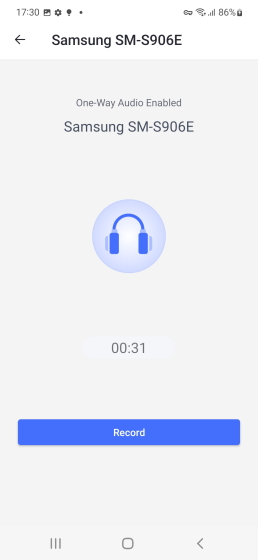
Parental involvement is occasionally required to protect your kids online. Fortunately, that is also covered by the built-in features of AirDroid Parental Control. The software lets parents view their child's camera and microphone in real time from a distance. So you can instantly access their camera and microphone to check on your kids if you think they could be in danger. You may also utilize the screen mirroring option to view your child's screen at any moment if you'd rather see what's occurring on it in real time. However, I did see that when using these capabilities, the child phone's camera and mic indicators as well as screencasts light up due to Android's privacy restriction.